Products   Support   Download   Contact
What PDF Broker
customers are saying:
"The Accounting Department just loves this program. I have never seen them so happy about anything from IT. Great job!"
– IT Manager at an electronic components distributor
 
"We continue to find new uses for this application. It's a real time-saver!"

–Help Desk Manager at a
major software distributor

 
"I have finally retired my fax machine! What an excellent office automation tool. "
– Office manager at an electrical contractor
 
 
Features Scenarios Download


The PDF Broker is easily adapted to your workflow automation needs. Here, three examples demonstrate how the Broker saves time and money in real-world situations:


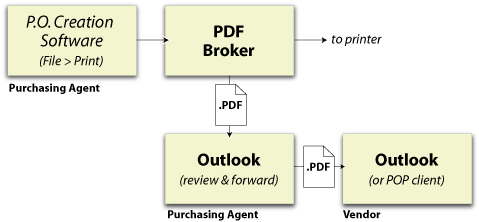
Scenario 1: Purchasing Agent


The purchasing agent generates Purchase Orders that must be reviewed for accuracy, approved, and mailed to vendors.

This process can be streamlined considerably using the Broker.

In this example, the PDF Broker automatically routes PDF file back to the purchasing agent for review and simultaneously prints the P.O.

After review, the agent forwards the PDF to the vendor from within the email application.


Advantages:

  • Hardcopy P.O. and PDF file are created simultaneously, from one command.
  • PDF file is automatically delivered to the purchasing agent's email inbox.
  • Email client provides convenient archival of P.O.s for future reference.


Scenario 2: Accounting Clerk (PDF Broker with ScriptServer PAN electronic forms)
 

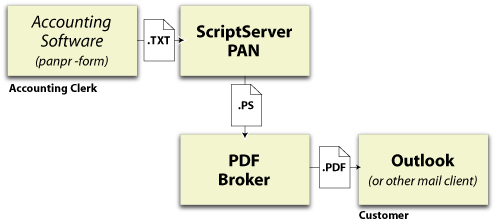
Creates PDF version of an invoice based on ScriptServer PAN electronic forms, which sends its PostScript output to the PDF Broker.

The PDF Broker converts the file to PDF then mails the document directly to the customer.


Advantages:

  • A single print command merges the text file with the electronic form, converts it to PDF format, and delivers it to the customer's inbox.


Scenario 3: Electronic form merge, print, archive, & e-mail
 

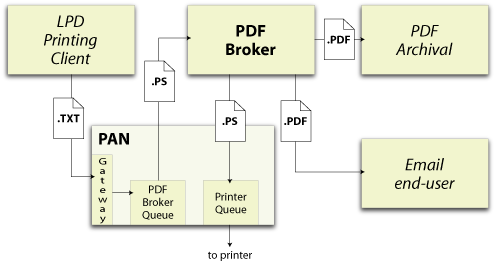
In the example, a document originates from a Unix-based system on the network using a generic LPR/LPD client to print the file.

It enters the PAN printing system through its LPD Gateway and gets sent to a queue that merges the print data with an electronic form and sends the result to the PDF Broker.

The Broker has three routers associated with this input port, after converting the file to PDF, the following happens:

  • the original PostScript is sent back to PAN for printing
  • a post-processing batch file places the PDF file in an archive
  • the PDF file is e-mailed tio the document's originator
 

Advantages:

  • A single print command from a foreign host causes simultaneous printing, archival, and emailing to occur.
  • PDF archival is DOS batch script-based, so any command line archival tool could be used.


© 2007 GrayMatter Software Corporation